比木白-多种方式搭建项目

express+react+webpack

原因

最近在写拓海官网的后台web项目,本来是想用webpack-dev-server搭建开发环境服务器的,后来查资料发现,webpack-dev-server没有express+webpack-dev-middleware+webpack-hot-middleware灵活,且第二种方案热更新走的是内存,所以就尝试了使用第二种方案。
搭建好之后,发现第二种方案用起来超级爽,既可以配置webpack,也可以灵活自由的配置express服务器和各个中间件,另外由于我们是多入口的打包(就是每次打包,只打包项目中的一部分,也就是想打包的入口页面),所以使用第二种灵活的方案很适合现有的需求。

详情 首先我们先下载需要的进行配置的第三方外部依赖包,这些第三方外部依赖包的使用和作用会在之后介绍

script
1
npm install webpack webpack-cli @babel/cli @babel/core babel-loader @babel/preset-env @babel/preset-react file-loader url-loader core-js style-loader css-loader postcss-loader less-loader less ts-loader extract-text-webpack-plugin@next mini-css-extract-plugin express webpack-dev-middleware webpack-hot-middleware @babel/plugin-transform-runtime @babel/plugin-proposal-decorators @babel/plugin-proposal-class-properties @babel/runtime-corejs3 @babel/runtime autoprefixer webpack-bundle-analyzer html-webpack-plugin yargs shelljs ora glob cross-env http-proxy-middleware happypack terser-webpack-plugin connect-history-api-fallback --save-dev

配置babel.config.js编译文件

@babel/preset-env 是babel进行编译es2015语法以上的模块,这里为了兼容更老的浏览器,比如说IE8,使用了core-js模块注入到入口处,属性按需加载@babel/runtime-corejs3模块:core-js第三版本

@babel/preset-react 是babel进行编译react jsx语法的模块

@babel/plugin-proposal-decorators 是babel进行编译 @xxx 这种装饰器的模块

@babel/plugin-proposal-class-properties 是babel进行编译 类似于js变量类型规范,比如prop-types这种第三方外部依赖包的模块

1
2
3
4
5
6
7
8
9
10
11
12
13
14
15
16
17
18
19
20
21
22
23
24
25
26
27
28
29
30
const config = {
presets: [
[
'@babel/preset-env',
{
useBuiltIns: 'entry',
corejs: 3
}
],
'@babel/preset-react'
],
plugins: [
[
'@babel/plugin-proposal-decorators',
{
legacy: true
}
],
'@babel/plugin-proposal-class-properties',
[
'@babel/plugin-transform-runtime',
{
helpers: false,
regenerator: true
}
]
]
};

module.exports = config;

配置多入口部分页面打包、压缩、缓存和消除所有注释

yargs 此模块用于传递命令行传递参数,不是以{key: ‘value’}对象的这种结构,而是使用数组的数据结构,将外部的参数以字符串的形式来传递

ora 此模块使输出的命令行更有活力更有色彩更有仪式感,比如说ora().file(‘error’),如果执行到这一句,命令行就会输出 ✖ error

glob 此模块将所有查到的文件以数组的数据结构,在回调函数里面呈现出来,回调函数的第一个参数err,如果找不到文件等其他错误,就会报错;第二个参数files,就是查到的文件数组

shelljs 此模块在js文件中,使用此模块,可以在js语法中,使用命令行命令

1
2
3
4
5
6
7
8
9
10
11
12
13
14
15
16
17
18
19
20
21
22
23
24
25
26
27
28
29
30
31
32
33
34
const yargs = require('yargs'),
ora = require('ora'),
glob = require('glob'),
shelljs = require('shelljs');

const params = yargs.argv._[0];

if (!params) {
ora().succeed('必须传递参数!');
return false;
}

const start = () => {
glob('src/**/app.jsx', (err, files) => {
if(err) {
ora({
color: 'red'
}).stopAndPersist({
symbol: '✖',
text: '没有找到此文件'
});
}
const file = files.find(item => item.indexOf(params) !== -1) || '';
shelljs.exec(`npm set TARGET ${file} && node server.js`);
ora({
color: 'green'
}).stopAndPersist({
symbol: '✔',
text: '开发环境服务器启动成功~'
})
});
};

start();

配置webpack打包开发环境

path 该nodejs模块用于路径导航和路径拼接等功能

terser-webpack-plugin 该模块用于对js es2015语法的代码的压缩

html-webpack-plugin 该模块以某一个模版引擎或者是超文本传输协议文件作为基准进行处理,将提取出来的模块(js,css,image…)等其他资源注入到其模板中

happypack 该模块能够提高打包和编译的速度,使用多进程进行编译和打包,将主进程分为指定的多个分进程,当输出编译的打包时,会将多个分进程合并为一个主进程

webpack-hot-middleware 该模块可以对开发环境进行资源热加载,当项目中的文件内容发生变化时,资源热加载就会生效,引起开发环境服务器的重新刷新

webpack-bundle-analyzer 该模块可以查看打包之后各个入口模块资源的大小、体积、名称以及打包压缩之后的所有的特征

对于开发环境的css和less等样式文件的编译、打包、缓存以及压缩,本人不推荐使用extract-text-webpack-plugin和mini-css-extract-plugin,如果进行对css和less等样式文件进行抽取,当样式文件发生改变时,查找了好多资料,也使用了很多方法,比如css-hot-loader,都不会引起资源热加载,后来发现人家是有注释的: MiniCssExtractPlugin doesn’t support HMR;For developing, use ‘style-loader’ instead.
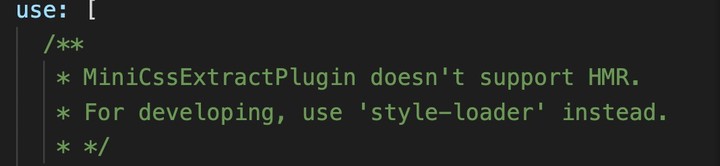
说明在开发环境,mini-css-extract-plugin修改样式文件,没办法引起资源热加载.所以我们在开发环境还是使用style-loader,而在预发和生产环境使用MiniCssExtractPlugin或者ExtractTextWebpackPlugin

1
2
3
4
5
6
7
8
9
10
11
12
13
14
15
16
17
18
19
20
21
22
23
24
25
26
27
28
29
30
31
32
33
34
35
36
37
38
39
40
41
42
43
44
45
46
47
48
49
50
51
52
53
54
55
56
57
58
59
60
61
62
63
64
65
66
67
68
69
70
71
72
73
74
75
76
77
78
79
80
81
82
83
84
85
86
87
88
89
90
91
92
93
94
95
96
97
98
99
100
101
102
103
104
105
106
107
108
109
110
111
112
113
114
115
116
117
118
119
120
121
122
123
124
125
126
127
128
129
130
131
132
133
134
135
136
137
138
139
140
141
142
143
144
145
146
147
148
149
150
151
152
153
154
155
156
157
158
159
160
161
162
163
164
165
166
167
168
169
170
171
172
173
174
175
176
177
178
179
180
181
182
183
184
185
186
187
188
189
190
191
192
193
194
195
196
197
198
199
200
201
202
203
204
205
206
207
208
209
210
211
212
213
214
215
216
217
218
219
220
221
222
223
224
225
226
227
228
229
230
231
232
233
234
235
236
237
238
239
240
241
242
243
244
245
246
247
248
249
250
251
252
253
254
255
256
257
258
259
260
const path = require('path'),
webpack = require('webpack'),
HappyPack = require('happypack'),
TerserWebpackPlugin = require('terser-webpack-plugin'),
ExtractWebpackPlugin = require('extract-text-webpack-plugin'),
MiniCssExtractPlugin = require('mini-css-extract-plugin'),
HtmlWebpackPlugin = require('html-webpack-plugin'),
BundleAnalyzerPlugin = require('webpack-bundle-analyzer').BundleAnalyzerPlugin;

const PUBLIC_DIR = '/',
OUTPUT_DIR = path.resolve(__dirname, '../build'),
TEMPLATE_DIR = path.resolve(__dirname, '../public'),
SRC_DIR = path.resolve(__dirname, '../src');

const TARGET = `./${process.env.npm_config_TARGET}`;

module.exports = {
devtool: 'eval',
mode: 'development',
entry: {
app: [
//在入口处配置热加载模块的客户端配置,设置资源热加载内容变化时,开发环境服务器重新刷新,目录配置则是__webpack_hmr'
'webpack-hot-middleware/client?path=__webpack_hmr&reload=true',
TARGET
]
},
output: {
publicPath: PUBLIC_DIR,
filename: `js/[name].[hash].js`,
path: OUTPUT_DIR
},
resolve: {
modules: [
'node_modules',
SRC_DIR
]
},
externals: {
jquery: 'jQuery'
},
optimization: {
runtimeChunk: true,
minimizer: [
new TerserWebpackPlugin({
//是否开启缓存机制
cache: true,
//是否开启多核压缩机制
parallel: true,
terserOptions: {
output: {
//是否删除除了含有@license意外其他所有的注释
comments: /@license/i
},
mangle: {
//开启对ie8浏览器的兼容
ie8: true,
//开启对IOS 10系统的兼容
safari10: true
}
},
//是否删除所有的注释
extractComments: true
})
],
splitChunks: {
chunks: 'all',
minSize: 0,
minChunks: 1,
cacheGroups: {
base: {
name: 'base',
minSize: 0,
minChunks: 1,
chunks: 'initial',
test: (module)=>{
return /(react|react-dom|lodash|moment|react-router)/.test(module.context)
}
},
commons: {
name: 'commons',
minSize: 0,
minChunks: 1,
chunks: 'initial'
}
}
}
},
module: {
rules: [{
test: /\.js[x]?$/,
include: [
SRC_DIR
],
use: [
//happypack对js以及jsx文件进行处理,id为jsx
'happypack/loader?id=jsx'
]
}, {
test: /\.css$/,
//在不使用style-loader的情况下,可以使用extract-text-webpack-plugin和mini-css-extract-plugin将css样式抽成文件
/**
use: ExtractWebpackPlugin.extract({
fallback: 'style-loader',
use: ['happypack/loader?id=css']
})
*/

use: [
//MiniCssExtractPlugin.loader,
/**
{
loader: MiniCssExtractPlugin.loader,
options: {
//只在开发环境开启资源热更新
hmr: process.env.NODE_ENV === 'development',
//当热更新失效时,是否强制刷新更新资源
reloadAll: true
}
}
*/
//happypack对css文件进行处理,id为css
'happypack/loader?id=css'
]
}, {
test: /\.less$/,
//在不使用style-loader的情况下,可以使用extract-text-webpack-plugin和mini-css-extract-plugin将less样式抽成文件
/**
use: ExtractWebpackPlugin.extract({
fallback: 'style-loader',
use: ['happypack/loader?id=less']
})
*/
use: [
//MiniCssExtractPlugin.loader,
/**
{
loader: MiniCssExtractPlugin.loader,
options: {
//只在开发环境开启资源热更新
hmr: process.env.NODE_ENV === 'development',
//当热更新不生效时,进行强制刷新更新资源
reloadAll: true
}
}
*/
//happypack对less文件进行处理,id为less
'happypack/loader?id=less'
]
}, {
test: /\.(png|jpeg|jpg|gif|bmp)$/,
use: [
//happypack对image图片文件进行处理,id为image
//'happypack/loader?id=image'
{
loader: 'url-loader',
options: {
limit: 102400,
name: '[name].[hash:6].[ext]'
}
}
]
}]
},
plugins: [
new webpack.HotModuleReplacementPlugin(),
/**
new ExtractWebpackPlugin({
filename: 'css/[name].[hash:6].css'
}),
*/
/**
new MiniCssExtractPlugin({
filename: 'css/[name].[hash:6].css'
}),
*/
new HappyPack({
id: 'jsx',
//将主进程分为4个分进程进行编译和打包
threads: 4,
loaders: [
//使用babel-loader对js以及jsx文件进行编译
'babel-loader'
]
}),
new HappyPack({
id: 'css',
//将主进程分为2个分进程进行编译和打包
threads: 2,
loaders: [
//使用style-loader,css-loader和postcss-loader对css文件进行编译
'style-loader',
{
loader: 'css-loader',
options: {
importLoaders: 1
}
},
'postcss-loader'
]
}),
new HappyPack({
id: 'less',
//将主进程分为2个分进程进行编译和打包
threads: 2,
loaders: [
//使用style-loader,css-loader,postcss-loader和less-loader对css文件进行编译
'style-loader',
{
loader: 'css-loader',
options: {
importLoaders: 2
}
},
{
loader: 'postcss-loader',
options: {
importLoaders: 1
}
},
'less-loader'
]
}),
//现在还不能使用happypack去多进程打包、缓存图片等应用url-loader模块的文件,会出现base 64图片等文件加载不出来的问题,具体看下面的问题结论链接
/**
new HappyPack({
id: 'image',
//将主进程分为4个分进程进行编译和打包
threads: 4,
loaders: [{
//使用url-loader对image文件进行编译
loader: 'url-loader',
options: {
limit: 102400,
name: '[name].[hash:6].[ext]'
}
}]
}),
**/
new HtmlWebpackPlugin({
//注入模块(js,css,image...)等其他资源的目录路径
publicPath: PUBLIC_DIR,
//处理的模板引擎或者是超文本传输协议文件的名称
filename: 'index.html',
//模板引擎或者是超文本传输协议文件的目录地址
template: `${TEMPLATE_DIR}/index.ejs`,
//选择要注入的模块名称
chunks: ['base', 'commons', 'app'],
//是否将注入的模块打上hash值
hash: true,
//注入到模板引擎或者是超文本传输协议文件的位置
inject: 'body',
//是否压缩模板引擎或者是超文本传输协议文件
minify: true,
//要传入到模板引擎当中的属性变量
templateParameters: {
}
}),
new BundleAnalyzerPlugin()
]
};

PS: url-loader配合happypack,base64图片加载不出来

配置express+webpack-dev-middleware+webpack-hot-middleware开发服务器

express 该模块用于启动nodejs服务器,可以作为路由、请求等处理,具体文档在这儿:express文档

http-proxy-middleware 该模块作为中间件,可以处理代理服务器请求,类似于webpack-dev-server devServer proxy的配置

webpack-dev-middleware 该模块作为中间件,可以处理资源热加载的启动

webpack-hot-middleware 该模块作为中间件,资源热加载的主要处理工具

connect-history-api-fallback 该模块作为中间件,处理404路由页面,重定向至index.html

1
2
3
4
5
6
7
8
9
10
11
12
13
14
15
16
17
18
19
20
21
22
23
24
25
26
27
28
29
30
31
32
33
34
35
36
37
38
39
40
41
42
43
44
45
46
47
48
49
50
51
52
53
54
55
56
57
58
59
60
61
62
63
const express = require('express'),
path = require('path'),
ora = require('ora'),
proxy = require('http-proxy-middleware'),
webpack = require('webpack'),
history = require('connect-history-api-fallback'),
webpackDevMiddleware = require('webpack-dev-middleware'),
webpackHotMiddleware = require('webpack-hot-middleware'),
dev = require('./config/dev');

const NODE_ENV = process.env.NODE_ENV,
PORT = 8024;

const app = express();

app.use(history({
//此配置最至关重要,用于中间件处理覆盖所有请求头为'text/html'或者'application/xhtml+xml'的文件,其余请求头不予处理
htmlAcceptHeaders: ['text/html', 'application/xhtml+xml'],
rewrites: [{
from: /^\/.*$/,
to: `${dev.output.publicPath}index.html`
}]
}));

app.use('/api', proxy.createProxyMiddleware({
target: 'http://10.64.57.204',
secure: false,
changeOrigin: true
}));

if (NODE_ENV === 'development') {
const compiler = webpack(dev);
app.use(webpackDevMiddleware(compiler, {
publicPath: dev.output.publicPath
}));
app.use(webpackHotMiddleware(compiler, {
//这里的heartbeat,值得是每隔3s,一检测资源内容是否发生变化,如果发生了变化,就强制资源热加载
heartbeat: 3000
}));
app.get('*', (req, res) => {
const file = path.join(__dirname, 'public/index.ejs');
//这里经过webpack打包、缓存、编译以及多进程处理之后,使用文件系统读取模板引擎或者超文本传输协议文件,将处理之后的资源放入到此文件中,并放入到开发环境服务器路由中
compiler.outputFileSystem.readFile(file, (err, result) => {
if (err) {
ora().stopAndPersist({
symbol: '✖',
text: '读取文件出现错误~'
});
}
res.set('content-type', 'text/html');
res.send(result);
});
});
} else {

}

app.listen(PORT, () => {
ora().stopAndPersist({
symbol: '✔',
text: `web网站已在localhost:${PORT}域名中启动`
});
});

配置postcss扩展样式表

autoprefixer 该模块用于css的样式扩展,兼容旧版本浏览器的样式

1
2
3
4
5
6
7
const autoprefixer = require('autoprefixer');

module.exports = {
plugins: [
autoprefixer
]
};

package.json 配置browserslist浏览器兼容以及版本列表

1
2
3
4
5
6
7
8
9
10
11
12

{
"browserslist": [
"Chrome >= 35",
"Firefox >= 31",
"Explorer >= 9",
"Safari >= 7.1",
"Opera >= 12",
"IOS >= 7",
"Android >= 4"
]
}

接着,我们要下载安装编写业务代码时的第三方外部依赖包

script
1
npm install react react-dom prop-types --save

之后,我们在每个入口处进行react配置

harmony
1
2
3
4
5
6
import React from 'react';
import {render} from 'react-dom';

render(<div>
我叫尹文楷,俺是一个好银,😂😂😂
</div>, document.querySelector('#app'));

最后,我们进行配置index.ejs或者index.html(模板引擎或者超文本传输协议)

1
2
3
4
5
6
7
8
9
10
11
12
<!DOCTYPE html>
<html lang="zh-cn">
<head>
<meta charset="UTF-8">
<title>express+webpack+react搭建一个web项目</title>
</head>
<body>
<div id="app">

</div>
</body>
</html>

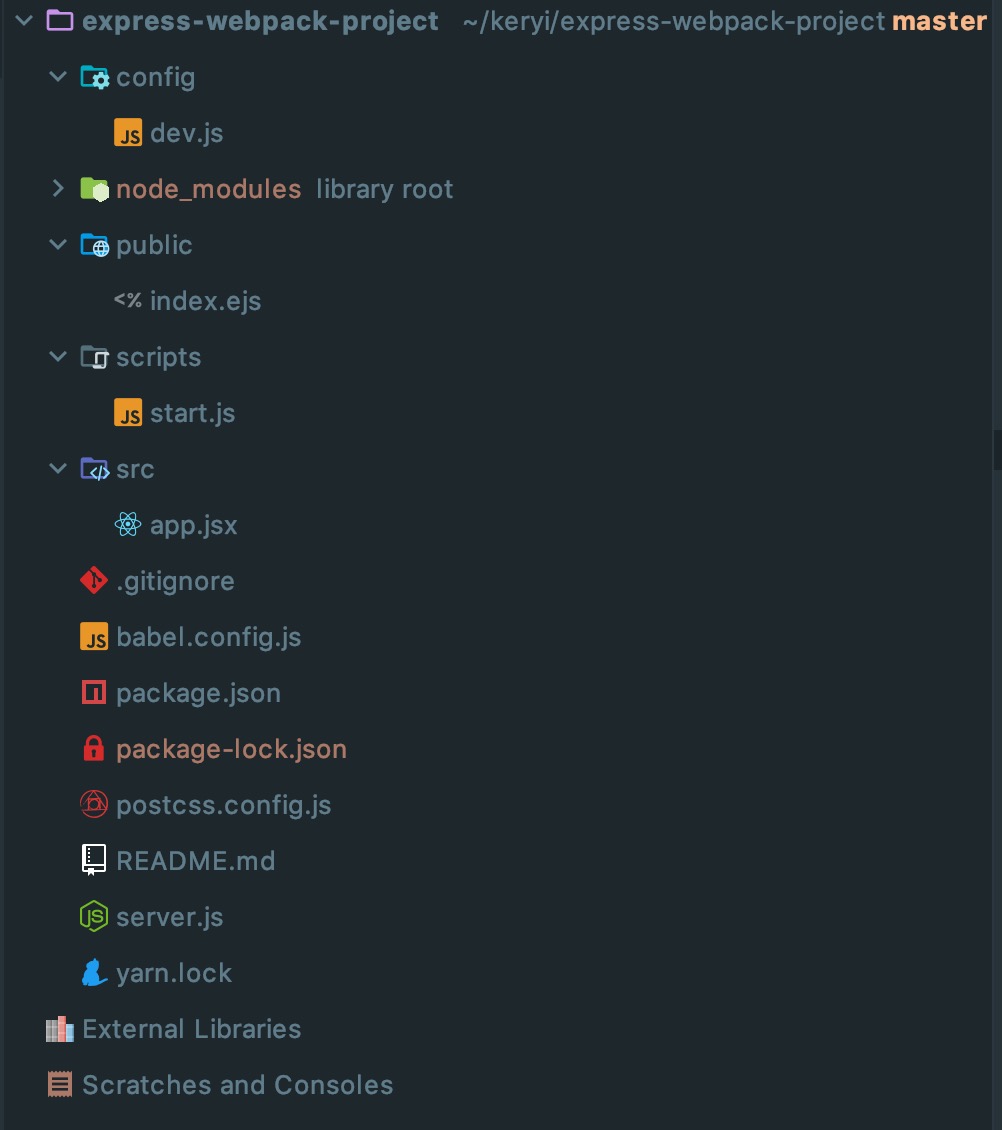
我们express+react+webpack方式搭建的web项目就已经完成了,最后的最后给大家展示一下我的目录结构
webpack+webpack-dev-server+react